More stores are chasing the same buyer in 2026, and ad space feels tighter because it is. Ecommerce brands are paying more for traffic, while conversion rates feel harder to protect.
That is why Google Shopping ads still matter. But they only work well when the feed, pricing, images, bidding, and tracking all line up. If you want steadier ROAS without guessing, Techeasify Infotech can help as a practical partner for brands that want cleaner campaigns and more predictable sales growth.
Table of Contents
ToggleWhat Are Google Shopping Ads?
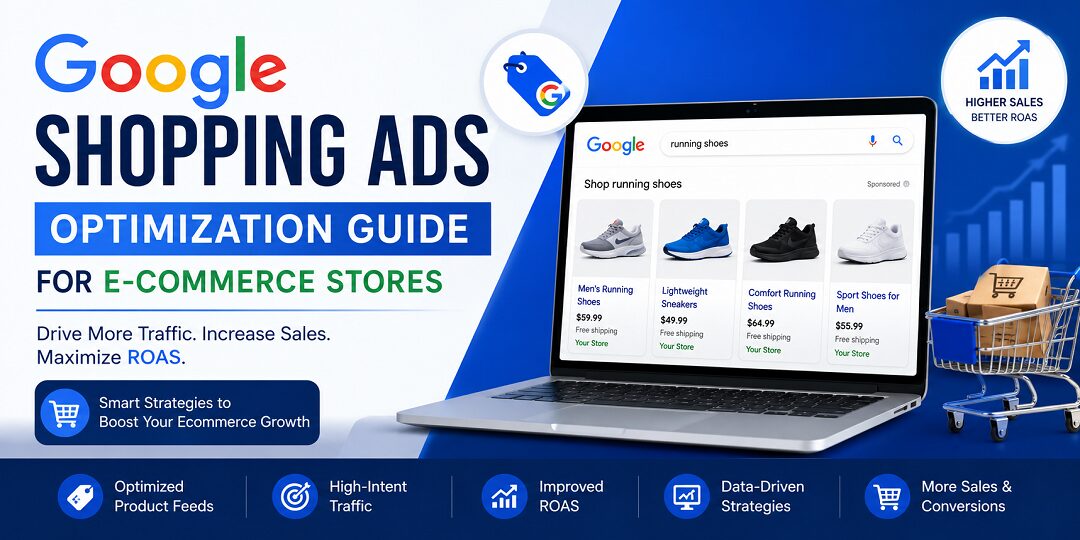
Google Shopping ads are product ads built for ecommerce. They show a product image, price, store name, and sometimes reviews right in search results. That makes them a strong fit for product searches, especially when shoppers already know what they want.
Unlike text ads, Shopping ads show the offer first. That visual format often helps brands get warmer clicks and better purchase intent.
How Shopping Ads show up in Google results
Google Shopping ads, often called product listing ads, appear as visual product cards inside search results. A shopper searches for something like black running shoes for men, then sees product photos, prices, and seller names right away.
That matters because people can compare products before they click. If your image, price, and title look right, you earn a stronger click. If not, you pay for less.
Shopping ads vs Search ads: what ecommerce brands should know
Text ads sell the click with copy. Shopping ads sell the click with the product itself. That usually means better intent for product-led searches.
| Feature | Shopping Ads | Search Ads |
|---|---|---|
| Format | Image, price, store name | Headline and description |
| Best for | Product searches | Broader intent, brand, and service terms |
| User intent | Usually closer to purchase | Can be early research |
| Control | Feed-led | Keyword-led |
For an ecommerce store, Shopping traffic often feels warmer because shoppers already saw the offer before clicking.
Why ecommerce stores keep investing in Shopping ads
These ads put products in front of buyers at the moment they are comparing options. That is hard to beat. A strong Shopping campaign can lift visibility, bring more qualified traffic, and scale faster than broad text campaigns alone.
That is also why many brands treat Google Shopping as a core part of their ecommerce PPC strategy. In 2026, Google is leaning harder into automation and broader shopping placements, so product data carries even more weight. For campaign structure and paid growth planning, see Techeasify Infotech’s Performance Marketing Services.
The Setup Steps That Make Or Break Performance
Optimization starts before the first bid. If the foundation is off, every later fix feels expensive.
Start with a clean Google Merchant Center account
Google Merchant Center is the home base for your product data. This is where Google checks your feed, shipping rules, tax settings when relevant, and policy compliance.
Verify your site. Set shipping clearly. Make sure return information and product availability are accurate. A messy account can lead to disapproved items, limited visibility, or total delivery issues.
For official guidance, review the Google Merchant Center Help Center. A bad setup here can block ad delivery or hurt product approval.
Build and connect a product feed that Google can trust
Your product feed is the language Google uses to understand what you sell. If the data is thin, outdated, or inconsistent, the campaign will guess wrong.
A strong feed usually includes:
- Clear product titles and descriptions
- Accurate GTINs, categories, and brand names
- Correct price and availability
- Clean, high-quality images
Feed quality improves relevance. Relevance cuts wasted spend. It is that simple.
If your site pages are weak, slow, or hard to update, your feed will struggle too. In that case, a better website foundation may help, so consider Techeasify Infotech’s Web Development Services.
Connect conversion tracking before you spend heavily
Without tracking, you are buying traffic with a blindfold on. You need purchase data first. Add-to-cart and begin-checkout events help too, but purchase tracking is non-negotiable.
This is where ecommerce conversion optimization starts. You need to know which products sell, which queries convert, and which clicks only look busy. If Shopping is part of a broader paid plan, understanding Performance Marketing Services helps you judge what is truly driving revenue.
Optimization Moves That Improve Roas And Lower Wasted Spend
Once the basics are in place, the real work begins. This is where many stores either grow or stall.
Write product titles that match real search intent
Titles do heavy lifting in Shopping. Put the most useful details first, like brand, product type, size, color, model, or key feature.
For fashion, Women’s Linen Shirt, White, Medium beats Summer Style Top. For electronics, Sony WH-1000XM5 Wireless Headphones, Black beats Premium Audio Headset. Clear titles help Google match the right product to the right search.
Improve images, descriptions, and feed quality together
Shoppers make fast decisions. Often, the image wins or loses the click before the description gets a chance. Use sharp product photos with clean framing. Make sure descriptions answer the obvious questions without padding.
Your feed must match the landing page exactly. Price, color, size, availability, and promo details should line up. If the ad promises one thing and the page shows another, conversion rate drops.
For best practices on product data and feed setup, Google’s own ecommerce recommendations are worth reviewing.
Split products by profit, demand, and performance
Not every product deserves the same bid or budget. Best sellers, high-margin items, and weak performers should not sit in one bucket.
A fashion brand might separate premium jackets, best-selling denim, and clearance items. An electronics store might split accessories from high-ticket devices. This gives you cleaner bidding and stops one noisy product from draining the whole campaign.
Use negative keywords and pricing checks to cut poor clicks
Shopping campaigns still need traffic filters. Negative keywords help block low-intent searches like free, used, or repair when those clicks do not fit your offer.
Pricing matters too. If your price is out of step with the market, better bidding will not save you. Shipping costs, discount timing, and promotional offers all shape Shopping performance. Sometimes the problem is not the ad. It is the offer.
Choose the right bidding approach for your goals
Google now pushes more stores toward automation, especially through Performance Max. That can work well when tracking is solid and conversion volume is healthy.
Newer accounts often need more control. Standard Shopping and manual or lightly automated bidding still make sense when data is thin, margins vary, or you want cleaner search term visibility. High-volume stores with stable conversion data often do better with Maximize Conversion Value or Target ROAS.
The goal is not to use the fanciest setting. The goal is to use the one your data can support.
Make the mobile shopping experience easy and fast
A lot of ecommerce traffic is mobile. If your product page loads slowly, hides the price, or makes size selection painful, you are paying for frustration.
Keep pages fast. Make buttons easy to tap. Let images load cleanly. Reduce checkout steps where you can. Better mobile experience usually means better return on ad spend, because fewer buyers drop off after the click.
Better feed data and cleaner traffic usually beat bigger budgets.
How To Keep Campaigns Healthy Week After Week
Google Shopping ads management is never one-and-done. Good accounts get watched, trimmed, and tested every week.
Review search terms and shopping queries regularly
Query reviews show you where money leaks and where growth is hiding. You can spot wasted intent, new product angles, and demand shifts before they snowball.
Each week, check:
- Search terms that spend but do not convert
- New converting queries worth stronger bids
- Products with high clicks and weak sales
- Disapproved or limited products in Merchant Center
Those patterns tell you what the market wants, and what it does not.
Adjust by device, location, and audience behavior
Small changes can move results without a full rebuild. Maybe mobile converts better for beauty products, but desktop wins for higher-ticket electronics. Maybe one region responds well to free shipping while another is price-sensitive.
Audience signals help too. Past buyers, cart abandoners, and customer lists can guide smarter prospecting and remarketing. Use them to support conversion decisions, not to replace them.
Track the metrics that matter for ecommerce growth
Watch ROAS, CPC, conversion rate, click-through rate, impression share, and average order value. But do not treat every metric the same. A store chasing volume will read the account differently than a store protecting margin.
Do not chase vanity metrics. A high CTR with poor sales is noise. The best number is the one tied to profit.
Common Google Shopping Ads Mistakes To Avoid
Even strong stores make avoidable mistakes. Fixing these can save money fast.
Poor product feed optimization
If your feed is thin or inconsistent, Google cannot match products well. That leads to weak targeting, lower relevance, and more wasted spend.
Ignoring negative keywords
Without negative keywords, your ads can show for low-intent searches. That can drain budget quickly.
Using low-quality images
Blurry or cluttered product photos hurt clicks. In Shopping, image quality can make a big difference.
No conversion tracking
If you cannot measure purchases, you cannot improve ROAS. Tracking is the foundation.
Mixing best sellers with weak products
When every product sits in one campaign, strong items can be held back by poor performers. Separate them by value and intent.
Google Shopping Ads Management Tips For Better ROI
This is where good accounts stay ahead.
Weekly campaign monitoring
Check budgets, disapprovals, conversion trends, and product performance every week. Small issues grow quickly if you ignore them.
Search query analysis
Look at search terms that convert, and cut the ones that do not. That keeps spend focused on buyers.
Device-based optimization
Some products sell better on mobile. Others convert better on desktop. Adjust based on real data.
Geo-targeting improvements
If certain cities or regions convert better, shift budget there. If one area spends but does not buy, lower exposure.
Audience layering strategies
Use customer lists, past visitors, and cart abandoners to guide better targeting. This can improve efficiency without rebuilding the entire campaign.
When To Bring In A Google Ads Agency For Ecommerce
There is a point where doing it yourself costs more than hiring help. That point arrives faster when ad spend grows.
A good ecommerce advertising partner should handle campaign setup, feed fixes, product grouping, testing, reporting, and landing-page feedback. They should care about sales quality, not only clicks.
That also means knowing how paid traffic fits with site speed, retention, and customer acquisition. Brands that scale well usually think bigger than one campaign.
Signs your store is ready to hire Google Ads experts
If spend is rising and ROAS is flat, that is a sign. So is a messy feed, poor tracking, or no time to review search queries and product performance.
Shopify brands, WooCommerce stores, and D2C teams hit this wall often. Growth creates complexity. Complexity creates waste.
Why Techeasify Infotech fits growth-focused ecommerce brands
Techeasify Infotech is a Surat-based team that works with ROI in mind. That matters when you need clear reporting, feed optimization, and full-funnel support instead of vague advice.
They are also helpful when the bottleneck is not only ads. Some brands need stronger SEO Services for long-term product visibility. Others need Digital Marketing Services to support broader ecommerce growth across channels.
Final Thoughts
Strong Google Shopping performance does not come from one clever campaign launch. It comes from clean setup, trusted feed data, smart bidding, and steady weekly management.
That is the real edge in 2026. Google Shopping ads reward stores that test, fix, and improve over time.
If you want better ROAS without wasting months on trial and error, contact Techeasify Infotech for ROI-focused Google Ads management and performance marketing support.
FAQ
Why are my Google Shopping Ads not getting any impressions?
Usually, this happens because of Merchant Center issues, such as disapproved products, missing GTINs, or mismatched data between your feed and website. Low bids or weak product data can also limit delivery.
What is the biggest difference between Google Shopping and Search ads?
Search ads rely on text keywords and headlines. Shopping ads are feed-led and show product images, prices, and brand details. Shopping usually attracts higher-intent traffic for product searches.
How do I stop wasting money on irrelevant search queries?
Review your search term report often and add negative keywords for low-intent terms like free, used, or repair. This helps your budget stay focused on shoppers who are more likely to buy.
Why should ecommerce brands choose Techeasify Infotech?
Techeasify Infotech offers practical, growth-focused support for ecommerce brands. The team provides transparent reporting, feed optimization, and full-funnel marketing help aimed at better ROAS and steady growth.
Is it better to use manual or automated bidding for Shopping ads?
If your account is new or has limited conversion data, manual or lightly automated bidding can offer more control. For established stores with stable data, automated bidding like Target ROAS often works better.