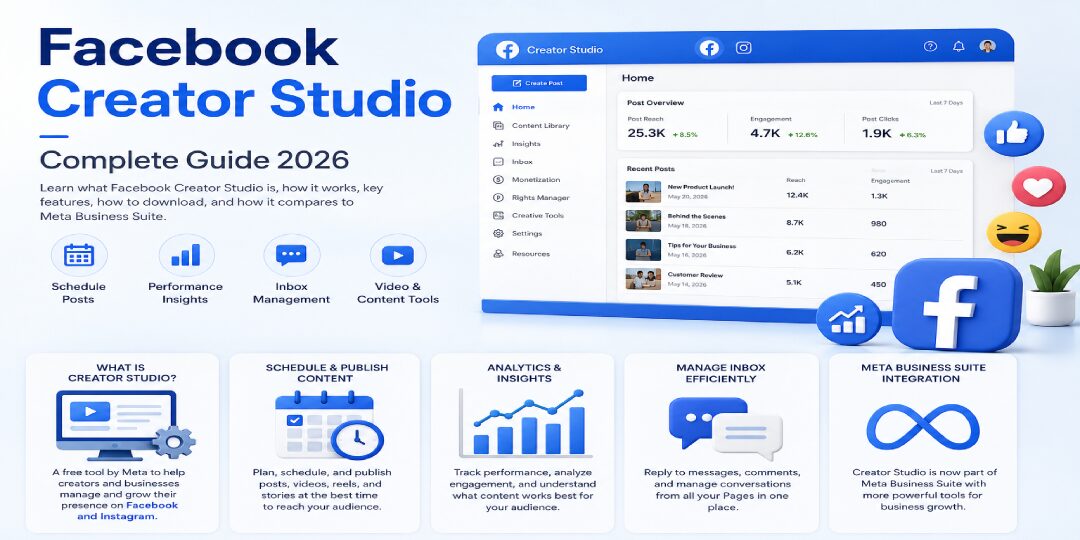
Meta’s Creator Studio changes have caused real confusion. The original dashboard disappeared in 2023, but a new AI-focused version entered limited testing in June 2026. If you manage a Page, create videos, or run social campaigns, you need to know which tool does what.
Facebook Creator Studio now means two different things: the retired management dashboard and a new creator-focused AI companion. You still need Meta Business Suite for daily publishing, messages, analytics, and account management.
https://www.youtube.com/watch?v=ZB0qXMU2kxYKey Takeaways for Using Facebook Creator Studio in 2026
- The original Facebook Creator Studio was retired in January 2023. Its publishing, inbox, analytics, and monetization tools moved to Meta Business Suite.
- Meta announced a separate AI-powered Creator Studio companion on June 24, 2026.
- The new app is Facebook-focused at launch and remains in limited testing.
- It can suggest ideas, surface trends, draft comment replies, and show daily priorities.
- It does not publish finished posts directly for you.
- Use Meta Business Suite for normal Facebook and Instagram management.
- Check monetization eligibility inside your Professional Dashboard because rules vary by product, country, account status, and policy history.
Here’s the truth: the new AI app isn’t a replacement for Business Suite. It is an extra layer for creators who want faster ideas and better guidance.
What Is Facebook Creator Studio, and Who Should Use It?
Facebook Creator Studio is now a term with a split meaning. The old Creator Studio was a dashboard for managing Page posts, videos, insights, messages, rights, and monetization. That system no longer operates as a separate management hub.The new 2026
Meta Creator Studio is an AI-first companion app for Facebook creators. It helps you find ideas, spot relevant trends, review performance, and draft responses to important comments.

You may also ask,
what is Meta Facebook? Meta is the parent company behind Facebook, Instagram, Messenger, and WhatsApp. Meta Business Suite is its main management hub for connected business accounts.Facebook Studio, Meta Creator Studio, and Meta Business Suite aren’t interchangeable terms anymore. Facebook Studio usually refers to the new creator experience. Meta Creator Studio refers to the AI companion. Business Suite remains the working dashboard.You can benefit from these tools if you are a creator, Page admin, ecommerce owner, freelancer, social media manager, agency, or small business owner. The right choice depends on what you need to do today.
Facebook Creator Studio vs. Meta Business Suite: Which Tool Do You Need?
Meta Business Suite is the public command center for your Facebook, Instagram, Messenger, and supported WhatsApp workflows. The new Facebook Creator Studio is a limited-access AI companion for Facebook creators.
| Feature | Meta Business Suite | New Creator Studio in 2026 |
|---|
| Main purpose | Manage accounts and business activity | Give creators AI-based support |
| Supported channels | Facebook, Instagram, Messenger, supported WhatsApp tools | Facebook-focused at launch |
| Publishing | Create, schedule, and manage posts | Does not publish finished posts directly |
| Inbox tools | Messages, comments, saved replies, and priorities | Suggests replies to key comments |
| Analytics | Post, Page, audience, and campaign insights | Personalized performance guidance |
| Monetization access | Dashboard access and eligibility checks | Can surface creator priorities |
| AI support | Selected AI features and automation tools | AI Creator Assistant is central |
| Availability | Public for eligible users | Limited test group and waitlist |
| Best use case | Daily publishing and account management | Ideas, trends, and reply support |
The old Creator Studio dashboard is gone. You cannot switch back to it.Choose
Meta Business Suite when you need scheduling, cross-platform posting, reporting, inbox management, or ads. Use the new Creator Studio only if you receive access and want help with content ideas or comment drafts.
Treat AI suggestions like a first draft. You still need to check the message, facts, tone, and timing.
The Features That Matter Most in Meta Creator Studio
The useful features are now divided between Meta Business Suite and the new AI Creator Studio. Business Suite handles your operational work. The AI companion helps you decide what deserves attention.
Content Planning, Scheduling, and Performance Insights
Use Meta Business Suite to organize posts, manage drafts, schedule videos, and cross-post where your accounts support it. You can review reach, engagement, watch time, audience activity, and post-level results.Don’t rely only on likes. Check retention graphs to see where viewers leave your video. If a 45-second product video holds attention for the first 25 seconds, repeat its hook, pacing, and visual style in your next posts.A practical content system beats random posting. Build a weekly plan around topics your audience already responds to.
Inbox, Community Management, and Rights Protection
The unified inbox can bring Facebook and Instagram messages and comments into one place, depending on your account setup. Use saved replies for common questions, but keep personal responses for real customer concerns.Set moderation rules for spam, abusive language, and repeated scams. Escalate refund requests, legal complaints, and sensitive issues to the right person instead of sending automated replies.Eligible video creators may also have rights-management tools. Access differs by region, account type, and content history, so check your dashboard before relying on it.
Monetization Tools and Eligibility Checks
Meta offers several monetization options, including ads on eligible video formats, Stars, subscriptions, and brand partnership tools. There isn’t one universal follower count or watch-time requirement.Your access can depend on the product, your country, age, account standing, payout setup, content originality, and the Meta Partner Monetization Policies. Check the
official Meta monetization help resources for current policy guidance.Open your
Professional Dashboard, select
Monetization, review policy issues, complete payout information, and confirm the requirements shown for your account. Do this before building a revenue plan around one feature.
The 2026 AI Creator Assistant and Its Limits
The new Facebook Creator Studio includes an AI Creator Assistant that can suggest content concepts, caption ideas, reply drafts in your voice, and relevant trends through an inspiration feed. Its daily priorities view can also surface recent performance, goal progress, and comments that need attention.The launch version is Facebook-focused. It is available only to a limited test group or waitlist, and it does not publish your completed post for you.Use AI to save time, not to replace your judgment. Rewrite drafts with your own stories, customer language, examples, and opinions before publishing.
Can You Still Get a Facebook Creator Studio Download?
If you search for a
facebook creator studio download, the short answer is no for the old standalone app. Meta deprecated the legacy mobile app, and the former dashboard was folded into Meta Business Suite in 2023.Don’t download unofficial APK files, copied apps, or third-party versions that claim to restore Creator Studio. They can expose your Page access, payment details, and login credentials.For normal workflows, install the official Meta Business Suite app from your device’s approved app store. You can also use Meta Business Suite on desktop for publishing, messages, insights, scheduling, and account settings.The 2026 AI Creator Studio companion is separate from the retired app. It is not a public download for everyone. Check official Meta announcements and account notifications to confirm whether you have access.
How to Use Facebook Studio Effectively for Sustainable Growth
Facebook Studio works best when you combine consistent planning with careful review. You don’t need to post every day. You need a clear purpose behind each post.
Your Beginner Setup Checklist
- Claim the correct Facebook Page and confirm your admin or task access.
- Connect an Instagram Professional Account when you need cross-platform publishing.
- Complete profile details, contact information, and Page categories.
- Set notification preferences for messages, comments, and account alerts.
- Check your monetization status inside Professional Dashboard.
- Add payout information only through official Meta settings.
- Create a simple weekly content plan with clear topics.
- Schedule one test post and review the result.
Before publishing, preview your links, captions, thumbnails, audience settings, and privacy options.
Five Ways to Improve Reach Without Losing Your Voice
- Pick one clear audience goal for each post, such as awareness, questions, visits, or sales.
- Build repeatable themes, such as product demos, customer questions, behind-the-scenes clips, or useful tips.
- Test different hooks and thumbnails, then compare the results.
- Study watch time and retention to find the moments that hold attention.
- Reply to meaningful comments and review results weekly.
AI drafts can reduce your writing time, but they should never become your entire voice. Add your own customer stories, practical opinions, and real examples.Don’t post copied content. Don’t chase every trend. Avoid automating sensitive replies where a customer expects a person.
Facebook Creator Studio FAQs for 2026
Is Facebook Creator Studio free to use?
Meta Business Suite is generally free for eligible Page and professional account users. Advertising, video production, agency support, and third-party tools have separate costs. The limited 2026 AI Creator Studio test is also reported as free during testing, but access and future terms can change.
What is the difference between Facebook Creator Studio and Meta Business Suite?
The old Facebook Creator Studio was retired and merged into Meta Business Suite. The new 2026 Creator Studio is a limited-access AI companion for creators. Meta Business Suite remains your main tool for publishing, inbox management, analytics, ads, and connected Facebook and Instagram workflows.
Can you download the Facebook Creator Studio app on your phone?
No, you can’t download the retired standalone Creator Studio app for standard use. Download the official Meta Business Suite app for daily management. Avoid unofficial downloads. Access to the new AI companion depends on Meta’s testing rollout and whether your account receives an invitation.
How do you qualify for monetization in Meta Creator Studio?
There is no single universal rule. Eligibility changes by product and location. Check Professional Dashboard, open Monetization, review your policy status, and confirm the requirements shown for your account. Meta may consider originality, age, payouts, follower levels, watch time, engagement, and account standing.
Ready to Scale Your Brand’s Social Media Presence?
Meta’s tools can be hard to manage when content, ads, reporting, and community replies all compete for attention. If you want support, TechEasify can help with strategy, content systems, account management, and performance-focused growth. Explore
social media management for businesses or work with
Facebook campaign optimization experts when you’re ready to boost your online presence.
Build Growth With the Right Creator Tools
The legacy Facebook Creator Studio is now part of Meta Business Suite. The new 2026 Creator Studio is a limited AI companion that helps Facebook creators find ideas, review priorities, and draft better responses.Use official dashboards, protect your account access, and verify monetization requirements before planning around revenue. Review every AI suggestion before it reaches your audience.
Facebook Creator Studio can save time, but consistent community engagement and data-based decisions are what help you grow.