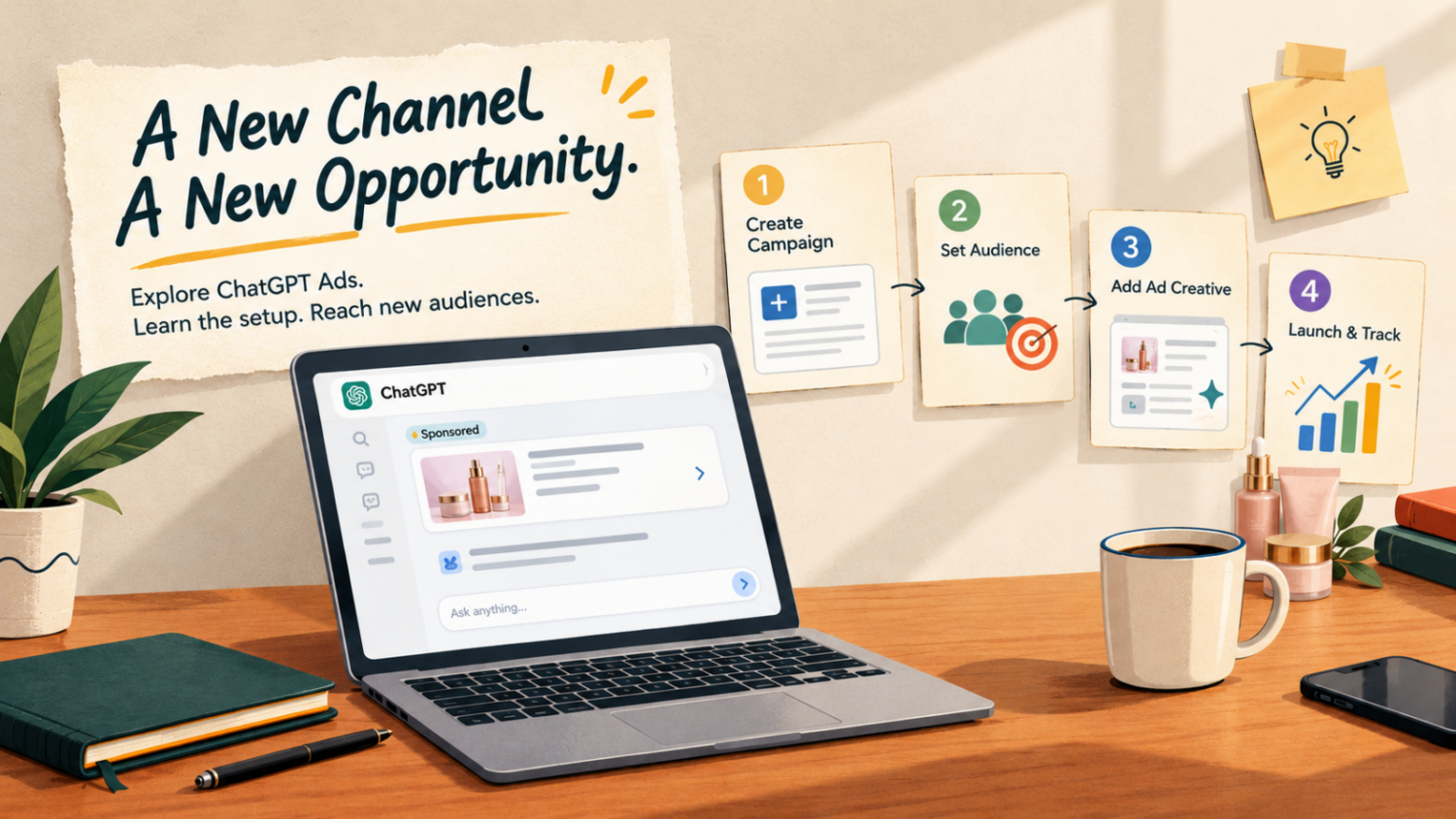




ChatGPT advertising is creating another opportunity for Indian businesses to reach potential customers while they research products, compare services, and explore solutions. Instead of relying only on traditional advertising channels like meta ads, google ads, amazon ads – brands can now explore sponsored placements within ChatGPT.
With ChatGPT sponsored ads, Indian brands can explore another way to introduce their products and services to potential customers while they research relevant topics and compare solutions.
For ecommerce sellers, startups, and service providers, the opportunity is to introduce their business to relevant audiences and direct interested users to useful landing pages.
However, getting started requires more than creating an advertisement. You need to understand the advertising platform, select the right campaign objective, prepare relevant creatives, and measure results against your business goals.
This guide explains how to advertise on ChatGPT in India, from account setup to campaign optimization.
What Is ChatGPT Ads Manager?
ChatGPT Ads Manager is OpenAI’s advertising platform for creating, managing, and measuring advertising campaigns on ChatGPT. Advertisers can organize campaigns, define budgets, create advertisements, configure targeting, and monitor performance.
You can access the platform through OpenAI Ads Manager.
Campaigns use three main levels:
- Campaign: Defines your advertising goal, budget, schedule, and targeting.
- Ad group: Organizes advertisements around a specific customer need or theme.
- Ad: Contains your brand details, advertising message, creative, and landing page.
OpenAI currently offers campaign objectives for Views, Clicks, and Conversions. The options available to you depend on the campaign type and account settings. See the official campaign setup documentation Templates for current requirements.
How ChatGPT Ads Strategy Differs From Search and Social Ads
Your advertising strategy should match how people discover and evaluate your business. ChatGPT Ads strategy differs from traditional search and social advertising in how businesses reach potential customers and present their offers.
Advertising platform | Primary role | What your strategy should focus on |
Google Ads | Reach people searching for products or services. | Search intent, relevant keywords, and conversion-focused landing pages |
Meta Ads | Build awareness and reach audiences through social platforms. | Audience targeting, creative testing, and engaging visuals |
ChatGPT Ads | Explore sponsored placements within conversational experiences. | Contextual relevance, clear messaging, and useful landing pages |
How to Build an Effective ChatGPT Ads Campaign
When planning a ChatGPT Ads campaign, focus on these practical steps:
Match your offer to the context: Make sure your product or service is relevant to the audience and advertising placement.
Keep your message clear: Explain what you offer and why it matters without using vague promotional claims.
Create a relevant landing page: Ensure the page answers likely customer questions and provides a clear next step.
Test before increasing spend: Run controlled campaigns alongside your existing advertising activity rather than immediately shifting your entire budget.
Measure business results: Track website visits, qualified enquiries, conversions, and acquisition costs to assess performance.
ChatGPT sponsored ads can be tested as an additional channel within your marketing mix. Use the results to determine whether they complement your existing search and social campaigns.
How to Set Up ChatGPT Ads Manager in India: A Step-by-Step Guide
Follow these steps to create your account, prepare a campaign, and launch your first advertisement.
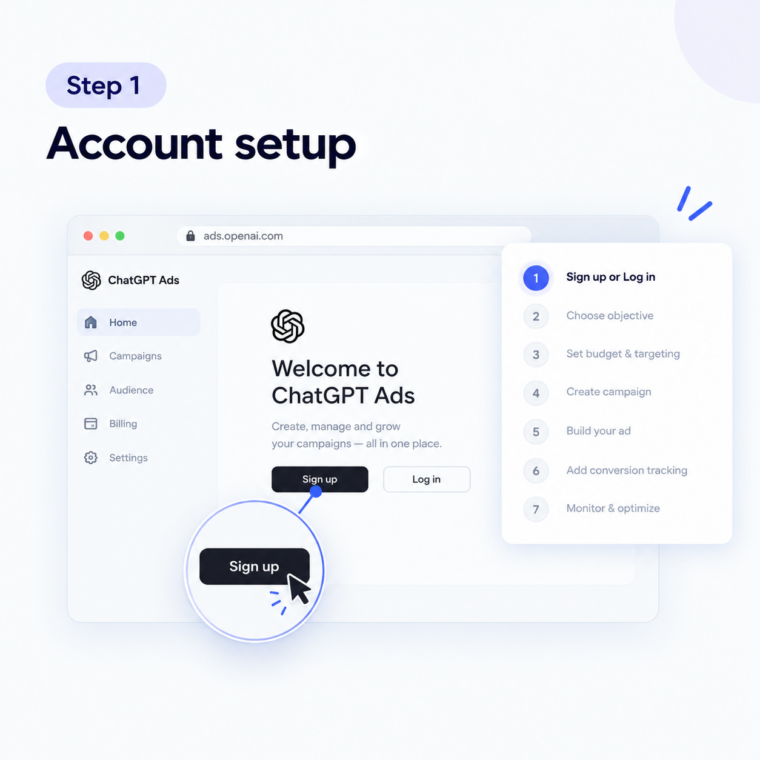
Step 1: Sign Up for ChatGPT Ads Manager
Visit ads.openai.com and select Sign up or Login.
You can sign in using your existing OpenAI account or create one if you do not have an account.
During onboarding, you can either enter your website URL to start creating an advertisement or skip that step and create a campaign later.
Review your advertiser details carefully, including your business name, country, billing currency, and time zone. OpenAI states that your country, currency, and time zone cannot be changed after account creation.
Complete the billing and verification requirements before launching your campaign.
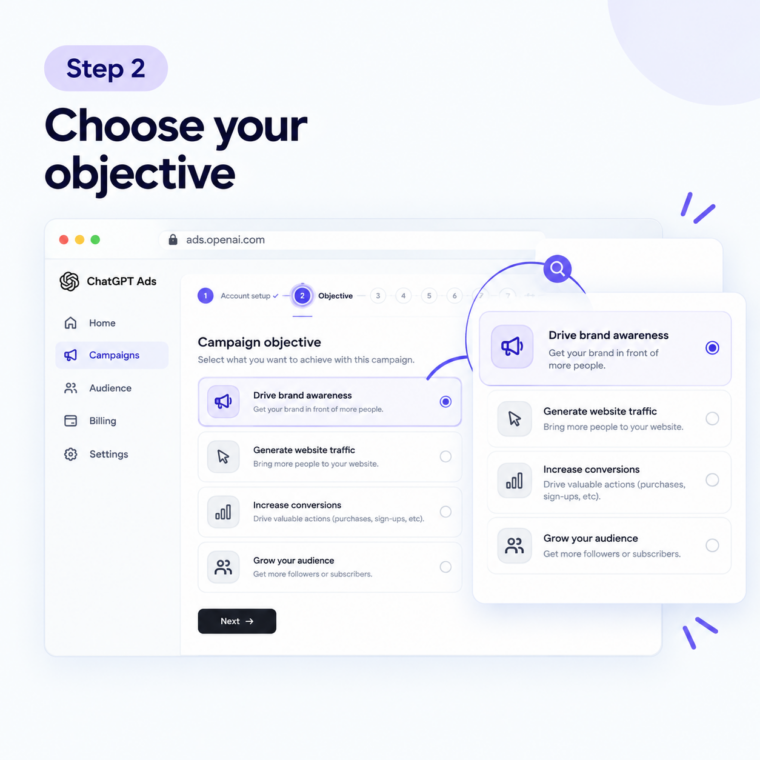
Step 2: Choose Your Campaign Objective
Select an objective based on what you want your business to achieve.
Campaign objective | Suitable business goal |
Views (CPM) | Brand awareness and exposure |
Clicks (CPC) | Website traffic |
Conversions | Leads, registrations, or purchases |
For example, a new ecommerce brand may start with a campaign focused on visibility. A business seeking enquiries may consider a conversion-focused campaign if the necessary conversion tracking is available.
Choose your objective before creating the campaign. OpenAI states that the objective determines how advertising delivery is optimized and how billing works. Changing the objective may require creating a new campaign.
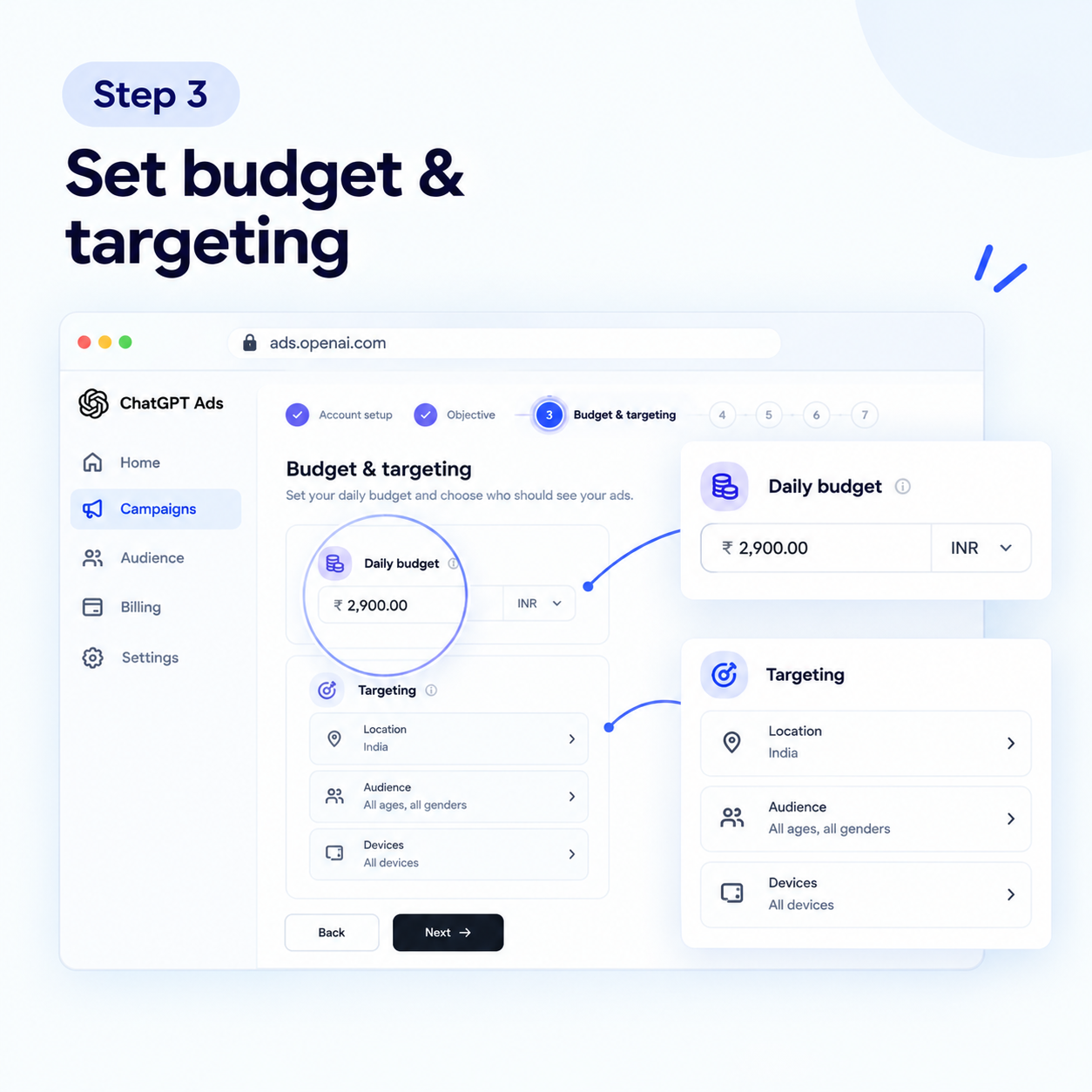
Step 3: Set Your Budget and Target Audience
Choose a daily or campaign-total budget, depending on the options available in your account.
OpenAI’s current documentation lists ₹725 as the minimum daily campaign budget for INR billing. This is the platform’s minimum, not a guarantee of sufficient reach or conversions.
Next, choose your eligible geographic targeting, platforms, and supported audience options.
If your customers are in India, start with the relevant Indian market rather than spreading your initial budget across unrelated countries. You can expand your targeting when you have evidence that your campaign is performing well.
Step 4: Create an Ad Group
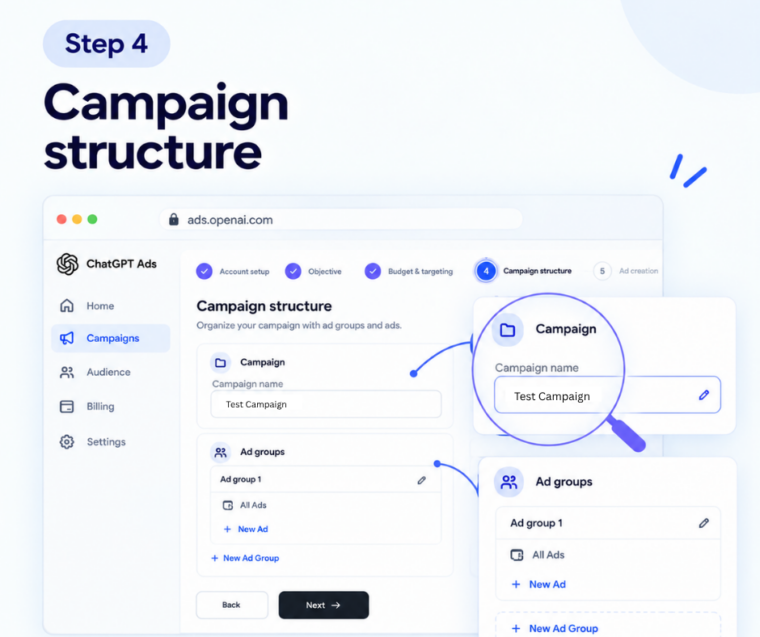
Create an ad group around a specific customer need, product category, or service.
For example, a digital marketing agency in india could create separate ad groups for:
- Google Ads management
- Facebook and Instagram advertising
- Ecommerce advertising services
Use relevant context hints to describe the themes or customer needs associated with each group. Base this on actual customer questions, service inquiries, and keyword research.
Keeping themes separate makes it easier to compare advertising messages and understand which areas attract useful traffic.
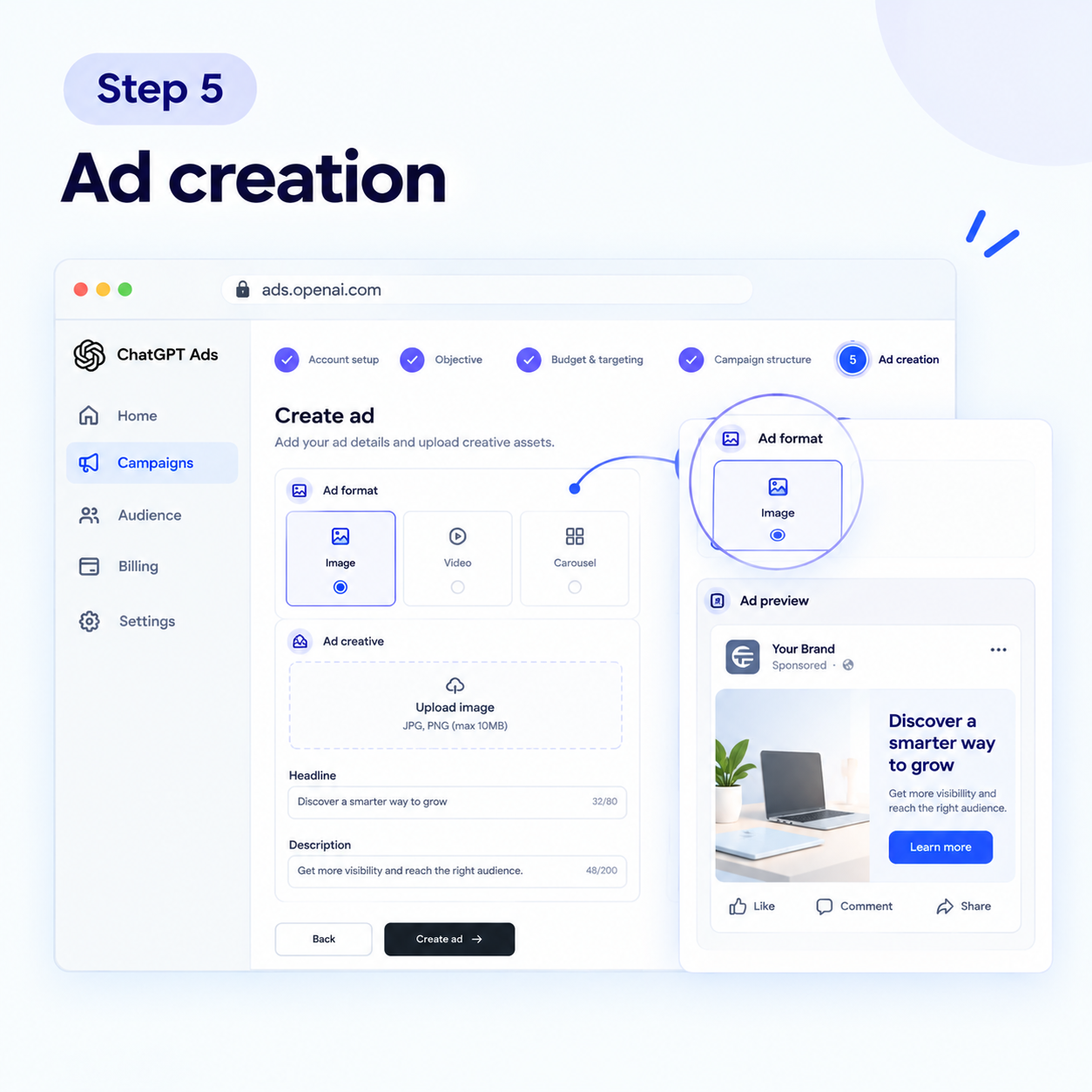
Step 5: Create Your Advertisement
Prepare your advertisement using the fields available in Ads Manager. These may include your brand name, logo, title, copy, image, and landing page URL.
For example:
Ad title: Performance Marketing for Brands
Ad copy: Build a measurable advertising strategy for your business.
Landing page: Your relevant performance marketing service page.
Keep the message specific and the claims accurate. Direct users to a page that explains the advertised product or service rather than sending every visitor to your homepage.
Before submitting, check that the landing page loads correctly on mobile and desktop and makes the next action clear.
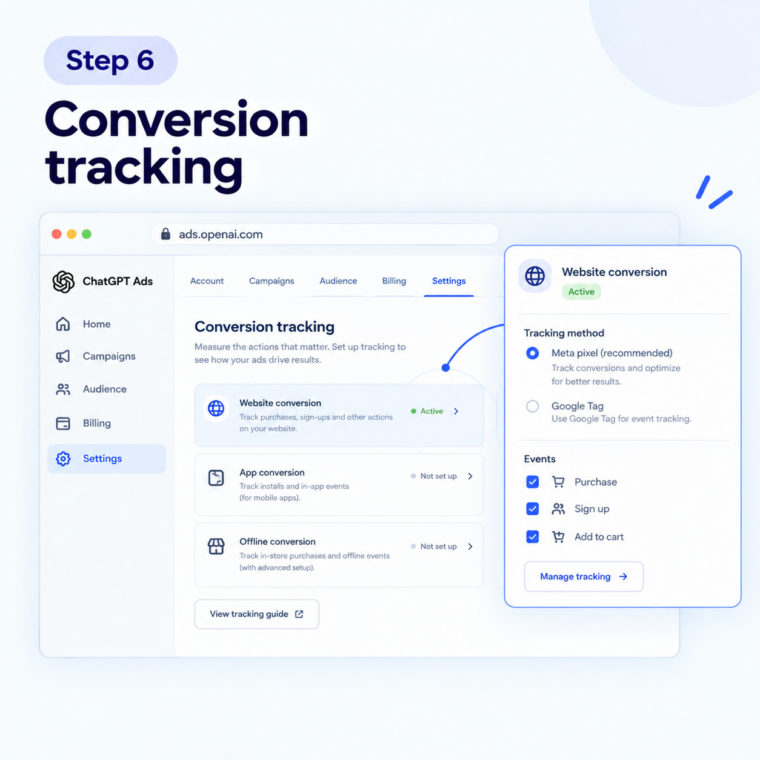
Step 6: Set Up Conversion Tracking
If your goal is lead generation or sales, configure conversion measurement before launching.
Choose an action that matters to your business, such as:
- A completed enquiry form
- A qualified lead
- A product purchase
- A registration
Use the supported conversion measurement options in Ads Manager and test whether your chosen event records correctly.
You can also add consistent UTM parameters to your destination URL to identify paid ChatGPT traffic in Google Analytics 4. For example:
utm_source=chatgpt&utm_medium=paid&utm_campaign=india_lead_generation
Use Google Analytics and your CRM together to understand whether advertising traffic produces meaningful enquiries and sales, not just visits.
Step 7: Review, Launch, and Optimise
Before launching, review your campaign objective, budget, targeting, ad copy, destination URL, and billing details.
Submit your advertisement for review. Your campaign can start delivering only when the applicable review, account, billing, and campaign requirements are satisfied.
After launch, monitor:
- Impressions and clicks
- Click-through rate (CTR)
- Cost per click (CPC)
- Cost per thousand impressions (CPM)
- Conversions and cost per conversion, where available
- Qualified leads and sales recorded by your business
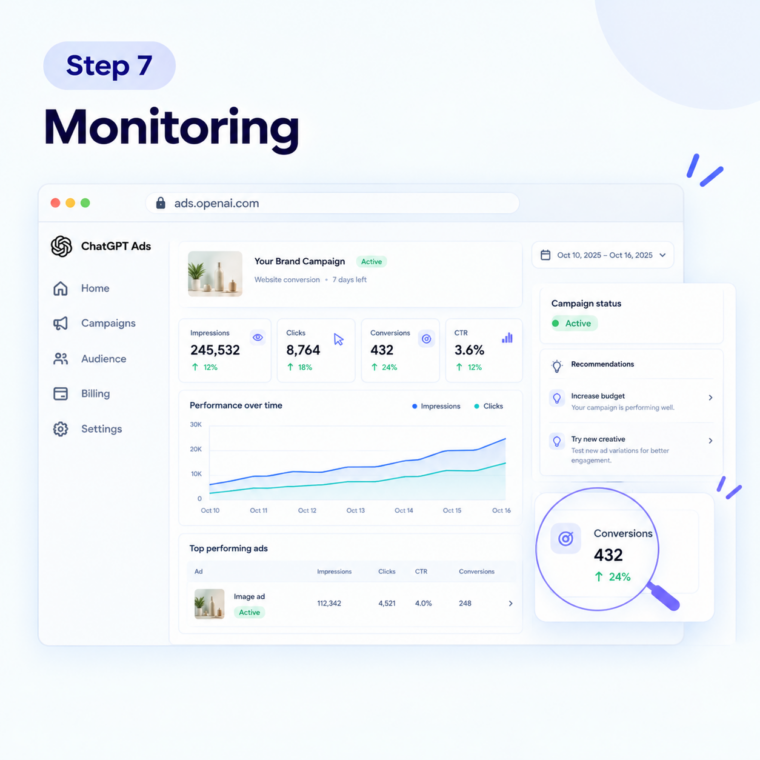
If clicks increase but enquiries remain low, check your landing page and conversion tracking before increasing your budget. If leads are relevant and the cost is acceptable for your business, test further creative variations and budget changes.
Remember: ChatGPT Ads Manager is still evolving, and performance benchmarks are not yet established across advertisers and industries. Base decisions on your own campaign data. https://help.openai.com/en/articles/20001220-frequently-asked-questions
How Can You Improve Your ChatGPT Advertising Results?
Once your campaign is running, focus on improving the quality of your results.
- Use one clear goal per campaign. Separate brand awareness campaigns from campaigns designed to generate leads or purchases.
- Test relevant messages. Try different value propositions and creative variations where supported.
- Improve your landing page. Make sure it answers the customer’s question and provides a clear next step.
- Measure lead quality. A high number of clicks or form submissions does not automatically mean better business results.
- Compare channels fairly. Evaluate ChatGPT advertising alongside your existing campaigns based on cost, lead quality, and revenue.
Read our guide to ChatGPT Ads vs Google Ads vs Meta Ads to understand how these channels differ and where each may fit into your marketing strategy.
Why Should Indian Businesses Consider ChatGPT Advertising?
ChatGPT advertising gives businesses another channel to explore alongside Google Ads, Meta Ads, and other digital marketing platforms.
Here are three potential benefits.
- Reach people researching solutions: Your advertisement may introduce your business to people exploring a relevant topic or considering different products and services.
- Build brand awareness: Sponsored placements can help more potential customers discover your brand.
- Support website visits and enquiries: With a relevant advertisement and landing page, you can encourage users to explore your products, request a quotation, or submit an enquiry.
For example, an Indian clothing brand could test advertisements related to festive collections, while a B2B service provider could promote a service that solves a specific business problem.
These are potential use cases, not guaranteed results. Actual campaign performance depends on ad delivery, relevance, competition, creative quality, and landing page experience.
For businesses investing in digital marketing, ChatGPT sponsored ads can complement existing search and social campaigns, helping brands test another advertising channel and evaluate its contribution to website visits and qualified enquiries.
AI Advertising Trends Indian Businesses Should know
Advertising is expanding beyond traditional search results and social feeds into conversational experiences, creating new opportunities for brands to reach potential customers. As platforms introduce sponsored placements, advertisers need to pay closer attention to contextual relevance, clear messaging, landing page quality, and measurable business outcomes. These developments are part of a broader shift in digital advertising. Read our article on the AI advertising revolution to explore the emerging trends and what they could mean for your marketing strategy.
Frequently Asked Questions
1. How can Techeasify help you get better results from ChatGPT Ads?
Techeasify helps businesses plan advertising campaigns around their target audience, budget, landing pages, and lead-generation goals. With over 10 years of digital marketing experience, our team can help you evaluate ChatGPT advertising opportunities and build a measurable campaign strategy. Contact Techeasify for advertising support.
2. How do I create a ChatGPT Ads campaign?
Visit OpenAI Ads Manager, sign in, complete your advertiser and billing setup, select an objective, set your budget and targeting, create ad groups and ads, configure measurement, and submit your campaign for review.
3. What is the minimum budget for ChatGPT Ads in India?
OpenAI’s current campaign documentation lists a minimum daily budget of ₹725 for INR billing. Check the official campaign documentation for the latest requirements.
4. Can small businesses and startups advertise on ChatGPT?
Yes, eligible small businesses and startups can explore self-service advertising in supported markets. Start with a clear objective, a manageable test budget, and reliable conversion tracking.
5. How do I measure ChatGPT Ads performance?
Track impressions, clicks, CTR, CPC, CPM, and supported conversion metrics. Use Google Analytics 4 and your CRM to evaluate lead quality, purchases, and revenue.
6. How do you set up a ChatGPT Ads Manager campaign?
To set up a campaign, sign in to ChatGPT Ads Manager, configure your advertiser account and billing, choose a campaign objective, set your budget and targeting, create ad groups and ads, and submit your campaign for review. For help planning your campaign, contact Techeasify.
7. Do you need a separate account to use ChatGPT Ads Manager?
No. You can sign in using your existing OpenAI account. If your business already has an advertiser account, ask its administrator to invite you. You can manage your campaigns through ChatGPT Ads Manager without creating a duplicate advertiser account.
Start Planning Your ChatGPT Advertising Strategy
ChatGPT advertising offers Indian businesses another channel to explore brand awareness, website traffic, and customer acquisition. The key is to choose the right objective, create relevant advertisements, and measure business outcomes before scaling your investment.
Techeasify is a digital marketing agency with over 10 years of experience helping businesses plan and manage advertising strategies around their commercial goals.
If you want to explore ChatGPT advertising for your business, contact Techeasify to discuss your campaign requirements.