If you sell snacks, drinks, home care, or any daily-use product, you cannot ignore quick commerce anymore. Blinkit, a leading quick commerce platform backed by the Zomato acquisition, has become a daily habit in top Indian cities with its hyperlocal operations, where people order groceries and essentials via this grocery delivery app in minutes, not days, thanks to its renowned instant delivery service and 10 minute delivery promise. That is why
blinkit advertisement is now a serious growth channel for D2C and FMCG brands, complementing other digital marketing channels in your Blinkit marketing approach.You use Blinkit as a shopper when you need something fast. Your customers do the same, relying on its instant delivery service for urgent needs. Blinkit ads let you show your products right at that moment, when intent and urgency are both high, much like how brands pair these with social media campaigns for broader reach. In this guide, you will see how Blinkit advertising works, what formats you can use, what it costs, and how to run your first marketing campaign with confidence.
Key Takeaways: Blinkit Advertisement For Fast-Growing Brands
- In the Blinkit marketing approach, you reach shoppers who are already ready to buy, not just scrolling for fun, thanks to the 10 minute delivery promise. This leads to quick conversions and shorter sales cycles for your marketing campaign.
- Blinkit, as a quick commerce platform, draws users who open the app for groceries, snacks, and daily essentials, so high-intent traffic is built into the platform. Social media campaigns can further drive qualified visitors here.
- With Blinkit advertisement, your products can appear via Blinkit ads on search results, category pages, home banners, and recommendation spots, boosting brand recognition improvement.
- Costs usually follow CPC, CPM, or CPA models, so you can control customer acquisition cost, marketing budget allocation, and how much you test at the start.
- Blinkit advertisement works best for FMCG, D2C, and essential brands that want fast results, repeat orders, and strong shelf presence in top Indian cities.
If you want a practical guide to advertising strategy for formats, costs, and setup, this walkthrough gives you a clear starting point.
What Is Blinkit Advertisement And Why Should Your Brand Care?
Blinkit is a grocery delivery app offering an instant delivery service where people order groceries, snacks, and essentials for ultra-fast delivery. Customers open the app, search for products, browse categories, add items to cart, and receive their order in minutes, thanks to efficient last mile logistics.Blinkit advertisement means paid spots inside this app. Your brand can show up as a sponsored result when someone searches “chips”, as a banner on the homepage, or as a highlighted product in a category like “detergent” or “pet food”. You buy visibility inside the shopping journey with Blinkit advertisement.This matters most if you sell FMCG, daily-use goods, or D2C products that fit into home consumption. Think chips, cold drinks, instant noodles, shampoos, soaps, household cleaners, cat food, or dog treats. Blinkit ads help you grab impulse buys and repeat orders.If you already run search or social ads, Blinkit becomes one more high-intent channel among digital marketing channels in your growth stack. Pairing it with a strong partner such as an
SEO company in Surat gives you a more complete performance funnel from search to instant purchase via this instant delivery service.
Simple Explanation of Blinkit Ads in Plain Language
Blinkit ads work a bit like getting the best shelf in a supermarket. Instead of your pack sitting on the bottom row, it jumps to eye level.Inside the app, through its hyperlocal operations, sponsored products and brand banners appear where people already shop. When someone types “juice”, your brand can show at the top. When they open the snacks category, your chips can appear before others. You simply pay to get better visibility inside a busy store that lives on your customer’s phone.
Why Brands Should Advertise on Blinkit Today
You tap into frequent orders, reflecting consumer behavior trends, because people buy groceries and snacks many times a week.You reach shoppers in big cities where quick delivery is already a habit.You get high-intent traffic, as users open the app to buy, not just browse content.You can test new SKUs fast and see within days if they move or not.You can compete with larger brands in the quick commerce rivalry even if you are a younger D2C label, as sponsored placements boost your brand visibility and help you stand out.You also plug into Blinkit’s own growth push, since the company is investing heavily in marketing campaigns and brand partnerships, as seen in their campaigns shared on
Blinkit Brand Central.
Why Blinkit Ads Work So Well for FMCG, Essentials, and D2C Brands
A competitive market analysis can help brands determine if they should enter this marketplace. For FMCG brands, Blinkit ads drive faster off-take. Your chips, chocolates, or instant noodles can sit at the top of snack searches, which leads to more trial and repeat.For essentials and daily-use brands, such as detergents, cleaners, shampoos, and pet food, Blinkit keeps you in the weekly basket. Sponsored spots help you win share inside categories that people buy on auto-pilot.For D2C brands, Blinkit advertising gives you direct access to customers without waiting for marketplace algorithms to favor you. Ready-to-eat meals, healthy beverages, premium soaps, and niche home care can all find their audience if you pair good offers with smart placements.
Who Can Advertise On Blinkit?
Getting your products in front of Blinkit shoppers is more open than you might think. You don’t need prior sales history, and there’s no minimum revenue requirement. Whether you’re a first-time brand, a direct manufacturer, or a D2C company, Blinkit welcomes you. Here’s what you actually need.
Do You Need to Be a Blinkit Seller First?
Yes, you do. But here’s the thing, getting set up as a seller and running ads happens in the same process. You can’t skip being a seller to just advertise. The good news is onboarding is straightforward if you have your basics in order.
Basic Eligibility Requirements
Before you can advertise, Blinkit needs to verify you’re a real, registered business. You’ll need:
- Valid GST registration (your 15-digit GSTIN). This is non-negotiable and must match all your documents exactly.
- Registered business entity – Private Limited, LLP, OPC, or sole proprietorship. Blinkit accepts all of them.
- Business bank account – Provide a cancelled cheque or bank passbook.
- Active seller account – Once Blinkit approves your registration and documents, you’re officially a seller.
- FSSAI license (if applicable) – Required if you’re selling food, beverages, or grocery items.
There’s also a listing fee of ₹25,000 per product per state, but Blinkit credits this as ad credits back to your wallet.
Who Should Advertise on Blinkit?
Blinkit works best for FMCG products, groceries, beauty items, home essentials, snacks, beverages, and personal care. The platform thrives on high-frequency, urgent-need purchases, things people buy repeatedly or need fast.D2C brands do well here too, especially with good margins and repeat-purchase products. First-time brands are welcome; you don’t need prior experience on other platforms.
Keep in Mind
Eligibility can shift based on Blinkit’s onboarding process and your category. Check
seller.blinkit.com for the latest requirements once you’re ready to apply.
How Blinkit Advertising Works: Targeting, Placements, And Process
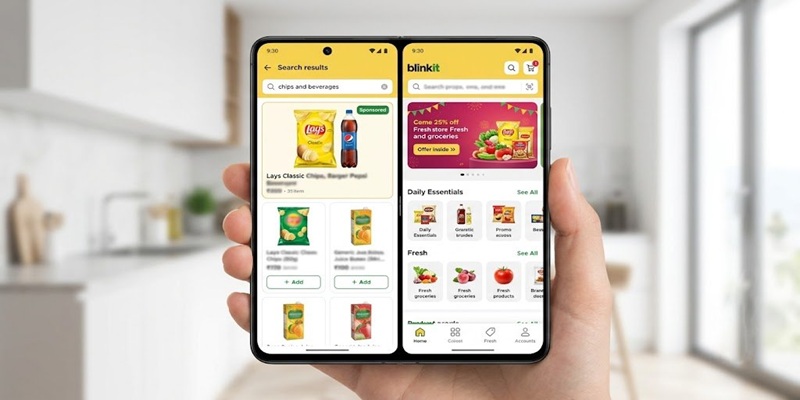
Blinkit advertisement is simple at the core. You choose what to promote, where it should show, and how much you are ready to spend. The platform then serves your ads to shoppers who fit your basic filters.Targeting is not as deep as Google or Meta, but intent is much stronger. People are already in a buying mood. Your job is to develop an advertising strategy by choosing the right categories, locations, and formats, then keep improving based on results.
Targeting Options for Blinkit Ads
You can usually target by:
- Location, such as city or pin code, to focus on areas where the instant delivery service is guaranteed fast and reach your top markets.
- Category, such as snacks, dairy, personal care, or pet care.
- Time frames or special windows, such as weekends or festivals, depending on the options Blinkit opens.
You cannot target detailed target audience demographics like “fitness lovers” or “new parents” as you might on Meta Ads. So you lean on product fit and category choice. For example, a chips brand can focus on evenings and weekends in metros, when people snack more.
Where Your Blinkit Ads Show: Key Placements in the App
Blinkit ads can appear in:
- Search results at the top when shoppers type a keyword. Great for intent and direct sales.
- Category pages when users browse “snacks” or “personal care”. Good for discovery and share of shelf.
- Homepage banners, which are more visual and work well for big offers or new launches.
- Product detail pages, where you can cross-sell or push related SKUs.
- Recommendation spots, such as “you may also like”, which support upsell and basket size.
Each placement supports a slightly different goal, from pure visibility to strong conversion.
Blinkit Campaign Workflow From Onboarding to Optimization
The basic flow is simple:
- Complete onboarding and account approval as a seller or brand, potentially partnering with a creative advertising agency for setup support.
- List your products with images, pricing, and stock details, addressing inventory management challenges to ensure robust management before launching ad campaigns.
- Add money to your ad wallet.
- Choose your ad types and placements.
- Set daily or total budgets through careful marketing budget allocation and campaign dates.
- Launch campaigns and watch performance.
- Keep improving bids, creatives, and products based on actual sales.
You can study a full setup journey using resources like this
Blinkit seller registration guide.
Types Of Blinkit Ads And When To Use Each Format
Most brands new to Blinkit think advertising means picking one ad type and hoping for results. The reality is different. Blinkit shoppers move through their buying journey in seconds. Some are just browsing. Others know exactly what they want and are searching for it. A few are ready to buy but comparing prices.Blinkit offers multiple ad formats because no single ad works for all these moments. Each format is designed to catch shoppers at a different point in their decision, whether they’re building awareness, actively searching, or about to buy.The right format for your brand depends on three things: your campaign goal, your product category, and where your customers are most likely to find you. Choosing wisely means you spend less money for better results.
Quick Overview: Blinkit Ad Formats at a Glance
| Ad Format | Best For | Where It Shows | Primary Goal |
|---|
| Product Booster | Driving sales | Top of search results & category browse | Convert ready-to-buy shoppers |
| Prime Banner | Building awareness | Top of Blinkit home screen | Reach broad audience, new launches |
| Recommendation Ads | Cross-selling | Home feed, cart page, repeat-buy sections | Increase basket size, automated |
| Brand Spotlight | Brand visibility | Scrollable carousel across home | Show multiple products, brand presence |
| Brand Store | Product range | Dedicated brand page in Blinkit | Browse full catalog, brand hub |
| Listing Spotlight | Discoverability | Search + category pages | Stand out among competitors |
| Category Page Takeover | Big campaigns | Entire category landing page | Seasonal, limited-time pushes |
Product Booster: Your Primary Sales Driver
What it does: Product Booster is Blinkit’s sponsored search ad. Your products appear at the top of search results, marked as sponsored. You pay only when someone clicks.
Where shoppers see it: Top of search results and category pages when shoppers actively search for your category.
When to use it: This is your workhorse. Allocate 80 to 90 percent of budget here in the first three months for direct, measurable sales.
Which industries benefit most: Snacks and beverages, personal care, household essentials, groceries, health and wellness.
Cost and expectations: Clicks cost ₹2 to ₹15 depending on category competitiveness. Expect strong ROAS in your first 90 days with right keywords and competitive pricing.
Campaign ideas: Launch new flavors with targeted keywords, promote seasonal products in advance, boost bestsellers with discounts during peak traffic.
Common mistake: Bidding on too many keywords at once. Pick 3 to 5 hero products first. Expand once they’re profitable.
Prime Banner: The Awareness Play
What it does: A large banner at the top of Blinkit’s home screen. It’s the first thing shoppers see when they open the app.
Where shoppers see it: Top of home screen, before any product listings. Maximum visibility.
When to use it: For new launches, festive campaigns, or repositioning. Starting budget: ₹5,000 to ₹10,000. Use strategically.
Which industries benefit most: New product launches, festive seasons, limited-time offers, brand repositioning.
Campaign ideas: Run for 3 to 7 days on launch day, run during festival peaks (mid-September for Diwali, November for year-end), announce new categories.
Creative tips: Keep it simple. One product image, bold headline, one reason to click. Words like “New,” “Limited,” “Special Price” work best.
Expected outcome: High impressions, moderate click-through rates. Generates 3 to 5 times ROAS. Focus on awareness metrics, not just immediate sales.
Recommendation Ads: Let the Algorithm Work
What it does: Blinkit’s algorithm automatically places your products in front of shoppers most likely to buy based on their browsing and purchase history. You don’t pick keywords. The system does it.
Where shoppers see it: Home feed, cart pages (“add this too” suggestions), repeat-buy sections.
When to use it: After validating Product Booster campaigns. Use for complementary products and repeat purchases.
Cross-sell and upsell examples: Chips + soft drinks, electronics + batteries, coffee + filters, snacks + napkins.
Why it works: The algorithm finds patterns you wouldn’t catch manually. It automatically connects products shoppers naturally buy together.
Budget consideration: Works on CPC model like Product Booster. Set daily budget and let it run. Smart targeting means good efficiency.
Campaign ideas: Target habitual purchases (daily essentials), push complementary SKUs without manual bundles, launch new variants and let the algorithm find buyers.
Brand Spotlight: Show Your Full Range
What it does: A scrollable carousel displaying multiple products from your brand. Shoppers see several of yours lined up together instead of just one.
Where shoppers see it: Home feed and category pages as a branded section.
When to use it: Once you have 3 to 5 performing products. Use to increase brand presence and let shoppers explore your range.
Which industries benefit most: FMCG brands with multiple SKUs, health and wellness, snack brands with product lines, personal care.
Why it works: Shoppers see your brand name and multiple products at once. They’re more likely to add 2 to 3 items from your brand instead of comparing with competitors.
Creative tips: Order by popularity or new launches. Use high-quality, consistent images. Highlight your bestseller first (gets most clicks).
Expected outcome: Increased brand awareness, higher average order value as shoppers add more items.
Brand Store: Your Dedicated Shop Inside Blinkit
What it does: A dedicated page with your brand name and logo where you organize all products by category or collection.
Where shoppers see it: Accessible from your product pages or Blinkit’s brand directory.
When to use it: If you have 10 or more SKUs on Blinkit. With 2 to 3 products, it won’t make much impact.
Which industries benefit most: D2C brands with multiple product lines, FMCG brands with large portfolios, established brands wanting dedicated presence.
Best practices: Update regularly with new or seasonal items. Highlight promotions at the top. Use clear category names shoppers search for. Keep descriptions consistent and simple.
Why it matters: A Brand Store signals authority. Shoppers see you have multiple products organized professionally and are more likely to trust and buy from you.
Listing Spotlight: Stand Out in Crowded Categories
What it does: A mini-storefront combining your product listing with a small banner. Makes your product visually prominent on search and category pages.
Where shoppers see it: Search results and category browse pages with more real estate than a regular listing.
When to use it: In highly competitive categories (personal care, groceries, snacks) where shoppers see dozens of similar options.
Why it works: A Listing Spotlight catches attention with better visuals and more information than regular listings.
Best practices for success: Use clear, high-quality product images. Show price advantage if you have one. Include customer ratings prominently. Highlight unique selling points (organic, new, bestseller).
Products that perform well: Items with 4+ star ratings, products with competitive pricing, new launches, trending categories during peak seasons.
Category Page Takeover: For Big Campaign Moments
What it does: Your brand takes over an entire category page. Your banner, messaging, and offers dominate that space.
Where shoppers see it: Full-width banners across the entire category landing page.
When to use it: Rarely and strategically. Use for major moments: new product launches, big seasonal campaigns, or limited partnerships. Premium placement requires premium budget.
Which industries use it: Major FMCG brands launching new products, seasonal campaigns (Diwali snacks, summer drinks), limited partnerships.
How to Choose the Right Format for Your Goal
Instead of picking formats randomly, match your campaign goal to the right ad type.
| Your Campaign Goal | Best Ad Format | Why |
|---|
| Launching a new product | Product Booster + Prime Banner | Booster catches active searchers; Banner builds awareness |
| Increasing sales of existing products | Product Booster | Direct path to buy; measurable ROI |
| Building brand awareness | Prime Banner + Brand Spotlight | Reach broad audience; show full range |
| Promoting seasonal offers | Product Booster + Category Takeover | Capture urgent demand; dominate the category |
| Driving repeat purchases | Recommendation Ads | Algorithm finds loyal customers automatically |
| Growing average order value | Recommendation Ads + Brand Spotlight | Cross-sell complementary items; encourage browsing |
| Expanding product range visibility | Brand Store + Brand Spotlight | Show customers you have options; increase discovery |
Confused About Which Ad Format To Choose For Your Goals?
Our quick commerce experts will analyze your products and recommend the best ad strategy to maximize your ROAS.
Get a Free Ad Strategy Consultation Blinkit Ad Cost: How Much Does Advertising On Blinkit Really Cost?
Blinkit advertisements usually follow performance-style models. You pay for clicks, views, or outcomes, not a flat fee for the month.CPC (cost per click) means you pay when someone taps your ad. CPM (cost per thousand impressions) means you pay for views. CPA (cost per action) means you pay when a sale or key action happens.In practice, many brands start with test budgets and then scale. Working with strong
performance marketing services can help you stretch each rupee and avoid random spending.
Pricing Models on Blinkit: CPC, CPM, and CPA Explained Simply
- CPC: You pay when someone clicks your ad. For example, you pay each time a shopper taps your chips ad from search.
- CPM: You pay for 1,000 views of your banner. For example, your juice banner shows 10,000 times in a day, and you pay based on that.
- CPA: You pay when a key event happens. For example, when someone buys your detergent after viewing your sponsored listing. Brands often track customer acquisition cost as an outcome when using these CPA models on this quick commerce platform.
How Much Do Blinkit Ads Cost and What Budget Should You Start With?
Many brands start with ad wallets in the ₹25,000 to ₹50,000 range for their first serious test. Some begin smaller, but you need enough spend to see patterns.Smart planning helps. Start narrow, focus on a few hero SKUs, and test one or two formats first. Watch return on ad spend before you push budgets higher. Effective marketing budget allocation is key here to optimize your initial tests.Final costs vary by category, city, competition, and your own goals. Conducting competitive market analysis can provide insights into these variations for Blinkit advertisements.
Blinkit Advertising Metrics You Should Track
Running ads without watching your numbers is like driving blind. You need to know what’s working, what’s costing too much, and where your money’s actually going. Here are the key metrics that matter.
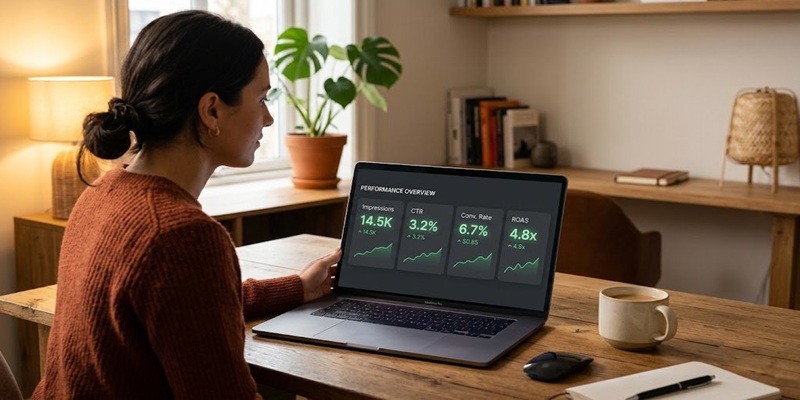
The Core Metrics Explained
- Impressions is how many times your ad shows up on someone’s screen. High impressions mean visibility, but visibility alone doesn’t mean sales. You need people to click and buy.
- Click-Through Rate (CTR) tells you what percentage of people who saw your ad actually clicked it. If 1,000 people see your ad and 50 click, your CTR is 5%. Anything above 2-3% is solid.
- Cost Per Click (CPC) is how much you pay each time someone clicks your ad. This shows if your budget is being spent efficiently. Lower CPC doesn’t always mean better results, a high CPC that converts is worth it.
- Conversion Rate is the real money metric. It shows what percentage of clickers actually bought. If 100 people clicked and 10 made a purchase, your conversion rate is 10%. This directly reflects how well your product and listing are resonating.
- ROAS (Return on Ad Spend) tells you how much revenue you make for every rupee spent on ads. A ROAS of 3:1 means for every ₹1 you spend, you’re getting ₹3 back in sales. This is your profitability number.
- Average Order Value (AOV) is the average amount each customer spends per purchase. Rising AOV while maintaining ROAS means your business is growing smarter.
Why Each Metric Matters
| Metric | Why It Matters |
|---|
| Impressions | Shows reach. High impressions + low CTR means your creative needs work. |
| CTR | Reveals how compelling your ad is. Dropping CTR? Refresh your creative. |
| CPC | Helps you budget efficiently. Rising CPC signals increasing competition. |
| Conversion Rate | Shows if people actually want what you’re selling. |
| ROAS | Your profitability metric. Stay above 2:1 to remain profitable. |
| AOV | Indicates customer quality and spending power. |
Check Weekly, Not Monthly
Look at metrics weekly. Spot trends early, sudden CTR drops or CPC spikes, so you can fix them before wasting budget. If ROAS falls below 2:1, pause and adjust.Focus most on ROAS and conversion rate. They tell you the real story: are your ads making money?
Benefits Of Blinkit Advertisement For Modern Brands
Blinkit advertisement gives you reach where it matters: in the carts of high-intent shoppers.You gain
fast feedback loops, because you see sales data within days, not weeks, thanks to the 10 minute delivery that powers quick commerce. You improve
product visibility in crowded categories where shelf space is tight. Daily-use brands fit especially well, since people reorder often.You also plug into the wider quick commerce trend that is reshaping urban grocery. When shoppers trust Blinkit for last-minute needs, your brand can grow alongside that habit.
Quick Conversions and Faster Sales Cycles
The instant delivery service and frequent shopping mean your Blinkit advertisement can turn into sales very fast. A snack brand, for example, might see evening orders spike when people feel hungry at home.Shorter cycles help you test offers and packs quickly. You do not wait months to discover which pack size or flavor works, and this quick conversion data supports better competitive market analysis for improved positioning.
Reach a High-Intent Audience Ready to Buy Now
Blinkit users have one clear goal: get products in their hands soon. They are not casually scrolling a feed.That mood makes each impression more valuable. If they see your milk, bread, or beverage ad at the right time, they are much more likely to buy, especially with the instant delivery service ensuring satisfaction.
Stronger Product Visibility for Daily-Use Items
Categories like milk, bread, snacks, soaps, and cleaners are crowded. Organic ranking alone often is not enough.Sponsored placements raise your SKUs above the noise and enhance brand visibility. When people see your pack again and again, you build recall and repeat orders.
Perfect Fit for Essentials, Daily Groceries, and Repeat Purchases
Products that people buy many times a month tend to win big on Blinkit. Fruits, vegetables, packaged foods, drinks, home care, and personal care all fit this pattern, reflecting shifting consumer behavior trends toward frequent, quick orders for daily essentials.That makes Blinkit a long-term growth channel, not just a short spike, through the Blinkit marketing approach. In the quick commerce rivalry, securing repeat orders is key to winning. With a consistent marketing campaign and steady stock, you can build a strong base of repeat buyers.
Step-by-step Guide: How To Run Ads On Blinkit
You do not need a big team to start. You need basic documents, good product listings, and a simple plan.Here is the Blinkit marketing approach, a clear flow to launch your first campaign.
Step 1: Complete Business Onboarding on Blinkit
Onboarding means setting up your seller or brand account. You share GST, PAN, bank details, and basic business information.You also submit product and brand details for review. Approval can take a few days, so start early if you have a festival or sale in mind. You can reference guides like this
Blinkit ads overview for D2C brands while you prepare.
Step 2: Add and Optimize Your Product Listings
Next, add each product with:
- Clear name and short description
- Bright, front-facing images
- MRP and offer price
- Accurate stock levels
To optimize, use simple titles that match what people search, highlight one or two key benefits in the description, and upload sharp pack shots. Strong listings make your ads convert better, because shoppers understand your product at a glance.
Step 3: Create Your First Blinkit Ad Campaign
Start by picking one clear objective as part of your advertising strategy, such as “boost sales for top three SKUs”.Then choose your main ad format for Blinkit ads, for example search plus sponsored listings.Select categories and locations where demand is already strong.Set a daily or total budget that you are comfortable testing. Focus on 1 or 2 hero products instead of spreading your money across 20 SKUs.
Step 4: Set Budget, Launch, and Monitor Key Metrics
Set your test budget and campaign dates for the marketing campaign, then go live.Watch a few simple numbers:
- Impressions (how many times people saw your ad)
- Clicks and CTR (how often they clicked after seeing it)
- Sales and ROAS (how much revenue each rupee of ad spend returned)
Give the campaign at least a few days before making big shifts.
Step 5: Analyze Results and Keep Improving
Look at which products, cities, and times of day perform best. Shift more spend to winners.Try small changes using growth hacking tactics, such as new images, sharper offers, promotional videos, or different keywords. Treat Blinkit ads as a weekly habit. That is how you stay ahead of new competition, as also suggested by tactics in this guide on
increasing Blinkit sales.
Best Practices To Improve Your Blinkit Ads Performance
Over time, the brands that win on Blinkit follow a few simple habits. Think of this as your ongoing checklist to keep Blinkit ads healthy and drive consistent performance.
Use Smart Keyword Strategy for Search and Sponsored Ads
Pick a mix of generic words such as “chips”, “hair oil”, or “cat food” and your brand terms. Make sure every keyword matches your actual products.Watch what shoppers already search for on the platform and match your titles and visuals to that intent.
Lead With Offers, Combos, and Value in Your Ad Creatives
Offer-driven ads work very well on Blinkit. Clear value moves people fast.Examples: “Buy 1 Get 1 on 200g chips”, “Flat 15% off on family detergent pack”, or “Breakfast combo: cereal + milk at ₹199”. Show the deal in big, simple text on your banners or pack shots.
Use High-Quality Images That Pop on Mobile Screens
Most shoppers use Blinkit on their phones. Your pack must look sharp on a small screen.Use bright images, plain backgrounds, and clear front-facing packs. If your offer is on the pack, make sure it is readable without zooming in. Better visuals usually mean better clicks, higher sales, and improved brand visibility.
Plan Seasonal and Festive Blinkit Campaigns
Plan special marketing campaigns around Diwali, Holi, New Year, IPL, and local events. Shape your offers and creatives around the mood of the season, aligning them with broader brand pushes like out-of-home advertising (OOH) for maximum impact.Snacks, sweets, drinks, and home care all see higher demand at these times. Timed campaigns can multiply your baseline performance. Many marketers now talk about this through social media campaigns, as seen in explainers like this
Blinkit ad targeting breakdown. With the Zomato acquisition, the platform’s scale offers better data and infrastructure for advertisers, and you can even leverage celebrity endorsements in your ads for stronger recall during these periods.
Keep Testing, Learning, and Optimizing Every Week
Make a simple loop part of your routine: test, measure, learn, adjust.Change bids slightly, pause weak SKUs, test fresh images, and rotate new offers. Regular tweaks keep your Blinkit advertisement profitable even as more brands enter the platform amid quick commerce rivalry, leading to brand recognition improvement through consistent, high-performing efforts.
Common Blinkit Advertising Mistakes To Avoid
Most advertisers don’t fail because of bad luck. They fail because they skip the basics. Here are the mistakes that tank campaigns, and how to avoid them.
1. Promoting Products With Low Inventory
Your ad works, someone clicks, they want to buy, and then, out of stock. Blinkit kills your ad visibility when inventory runs low. Stock out before you launch ads. Running out mid-campaign damages your seller rating and kills ROAS.
2. Choosing the Wrong Ad Format
Not all formats work for every goal. Display ads work for discovery. Search ads work when someone’s already looking. Mismatching format to goal wastes budget. Think about what you’re trying to achieve first.
3. Ignoring Product Listing Optimization
Your ad gets the click. Then people land on a weak listing with bad photos, unclear description, or confusing price. They bounce. Optimize listings before ads. Good images, clear descriptions, competitive pricing, and real reviews convert. Ads just bring traffic.
4. Not Monitoring Campaign Performance
Set it and forget it is a luxury you can’t afford. Campaigns drift. CTR drops. CPC rises. If you’re not checking weekly, you’re bleeding money. Small adjustments, pausing underperformers, increasing bids on winners, refreshing creative, compound into huge savings.
5. Setting Unrealistic Budgets
Starting too aggressive or too conservative both hurt. Too small and you won’t get enough data to optimize. Too large with poor ROAS and you’re losing money. Start modest, scale what works, kill what doesn’t. Growth happens incrementally.
6. Running Ads Without Offers
Blinkit shoppers hunt for deals. Running full-price ads in competitive categories is tough. A small discount, bundle deal, or free shipping can lift conversion rate from 2% to 5%. Offers create urgency.
The Real Takeaway
Optimization isn’t a one-time thing. Spend 30 minutes weekly reviewing data, pausing weak performers, and testing small changes. Winners pay attention.
Running Blinkit Ads But Getting Poor Results?
We’ll analyze every rupee you’re spending, eliminate underperformers, and maximize profitability fast.
Schedule Your Audit Blinkit Advertisement Vs Other Quick-Commerce Platforms
The Blinkit advertisement landscape underscores the quick commerce rivalry in a space bigger than one app. Instamart, Zepto, and others also fight for the same households.
Blinkit stands out for strong presence in top Indian cities through hyperlocal operations, very fast delivery, and focused assortment. Many brands choose to be on all major quick commerce platforms, then tune budgets based on actual performance data.
Blinkit vs Instamart: Which One Should Your Brand Prioritize?
Instamart often has wide reach through the Swiggy ecosystem. Blinkit is strong in selected urban clusters, backed by the Zomato acquisition for greater scale, and is pushing hard on marketing campaigns.Your best path is usually to test both, then compare cost per order and repeat rates while considering expansion plans in India for current and future city coverage. In some cities, Blinkit may deliver better returns and higher visibility for the same budget.
Blinkit vs Zepto: How the Platforms Differ for Ads
Zepto, like Instamart as a key quick commerce platform, also focuses on instant delivery service and urban users with a shared goal of 10 minute delivery. Product mix can be slightly different, and some neighborhoods favor one app over the other due to last mile logistics.Blinkit may be a better first step if your core audience is concentrated in Blinkit’s strongest cities or if you want a simpler entry into quick commerce ads. You can always expand to Zepto once you find product-market fit on one platform.
Related Article –
Zepto Ads Vs Blinkit Ads: Which Delivers Better ROAS For Brands In 2026? Industries That Gain The Most From Blinkit Ads
Not every category fits, but many do very well with Blinkit advertisement. In the quick commerce rivalry, securing loyal customers through targeted marketing campaigns per vertical is vital to survival in the market.
FMCG Brands: Snacks, Ready-to-Eat, and Packaged Foods
Snacks and RTE products are natural matches on this quick commerce platform. Chips, chocolates, biscuits, instant noodles, and ready-to-eat meals all benefit from impulse buying and repeat orders, especially with the appeal of 10 minute delivery.
Food and Beverage Brands That Thrive on Blinkit
Soft drinks, juices, energy drinks, tea, coffee, and breakfast items stay top of mind when people want something quick at home. Being visible at the point of craving through Blinkit advertisement is a real advantage.
Personal Care and Beauty Products
Shampoos, soaps, face washes, creams, and basic beauty items gain from frequent reorders. Strong offers and clear benefit statements in listings help shoppers try new brands, while brand recognition improvement plays a key role in building trust.
Household and Home Care Products
Cleaners, detergents, dishwash liquids, and floor cleaners are must-have items as essentials via the grocery delivery app. Blinkit ads help you win loyalty, because people do not like running out and tend to stick with brands that perform well.
Pet Care Brands on Blinkit
Pet food, treats, cat litter, and basic pet care products fit quick commerce very well as essentials on the grocery delivery app. Pet parents buy often and stay loyal once they trust a brand, which turns the Blinkit marketing approach into a strong engine for long-term repeat revenue.
Frequently Asked Questions About Blinkit Advertisement
What is Blinkit Advertising?
Blinkit advertising is a paid marketing solution that helps brands promote products within the Blinkit app. Businesses can use ad formats such as sponsored product listings, banners, and search placements to increase product visibility, reach high-intent shoppers, and drive more orders.
Who can advertise on Blinkit?
Businesses that sell products on Blinkit can typically access its advertising platform after completing the seller onboarding process. Eligibility may vary depending on product category and Blinkit’s approval requirements.
How much do Blinkit ads usually cost for a brand?
Costs vary by category, competition, and city, but many brands start with ad wallets in the ₹25,000 to ₹50,000 range. You can begin with smaller test campaigns, then scale if you see healthy return on ad spend and low customer acquisition cost. Your total outlay depends on how broad your targeting is and how aggressive your bids are.
Are Blinkit ads really worth it for FMCG and D2C brands?
For the right products, yes. Fast-moving, daily-use items such as snacks, beverages, personal care, and home care often see strong results. Success depends on your pricing, offers, product images, and how well you optimize your advertising strategy over time.
How can a brand start running ads on Blinkit?
You sign up as a seller or brand, complete onboarding, and list your products. Then you load your ad wallet, choose ad formats such as search or sponsored listings, pick your locations and categories, and launch campaigns. From there, you track results and keep refining.
Which industries should focus most on Blinkit advertisement?
FMCG brands for snacks and packaged foods, food and beverage brands for at-home consumption, personal care labels for repeat-use items, household brands for often-bought cleaners and detergents, and pet care brands for food, litter, and treats. All of these see frequent purchase cycles that fit Blinkit well.
Is Blinkit Advertising Worth It?
Here’s the honest answer: It depends. Blinkit Ads can be incredibly profitable for some businesses and a waste of money for others.
Who Benefits Most
Blinkit works best for high-frequency purchases. FMCG, grocery, beauty, and home essentials sell consistently because people buy them repeatedly. D2C brands with good margins and repeat-purchase products also win here. What doesn’t work? Furniture, expensive electronics, niche products, or ultra-luxury items.
When Ads Pay Off
- Product Launches – Get visibility fast when introducing something new.
- Seasonal Campaigns – Peak seasons (festivals, summer) mean higher demand and better ROAS.
- Increasing Visibility – New to Blinkit? Ads help you get discovered.
What Actually Determines Success
- Product Demand – Is there real demand? No ad fixes a product nobody wants.
- Competitive Pricing – Customers compare instantly. Overpriced products won’t convert.
- Quality Listing – Poor images and vague descriptions kill conversions. Ads bring traffic; listings close sales.
- Realistic Budget – Start with at least ₹15,000-₹25,000. Smaller budgets don’t give you enough data to optimize.
- Weekly Optimization – Winning advertisers monitor metrics, pause underperformers, and test new creatives. Set-and-forget doesn’t work.
The Verdict
Blinkit Ads are worth it if you sell high-frequency products, have competitive pricing, a solid listing, realistic budget, and commit to optimization. They’re probably not worth it if you’re selling niche products, overpriced items, or have minimal budget.
Bottom line: Blinkit Ads work for the right businesses with the right effort. Start with a test budget, measure everything, and scale what works.
Conclusion
Blinkit has become one of the most effective advertising channels for brands looking to reach shoppers at the point of purchase. Whether you’re launching a new product, increasing visibility for your best-selling SKUs, or driving more orders during seasonal campaigns, the right Blinkit advertising strategy can help you achieve measurable results.Success, however, goes beyond simply launching campaigns. Choosing the right ad formats, optimizing product listings, monitoring performance metrics, and refining campaigns regularly are all essential to maximizing your advertising budget and improving ROAS.If you’re planning to advertise on Blinkit and want expert support, Techeasify’s
Quick Commerce Agency can help you develop, launch, and optimize campaigns tailored to your business goals. From campaign strategy and creative planning to ongoing performance optimization, our team works with brands to achieve sustainable growth through quick commerce advertising.Ready to scale your Blinkit presence?
Contact Us to discuss your advertising goals and create a winning strategy.